
Sony Sound Connect App Redesign
This Sony Sound Connect App Redesign makes it effortless to link, control, and customize speakers through a unified app, combining powerful functionality with a clean, user-friendly design.
- Figma

Our DocHub Website Redesign makes editing, signing, and sharing documents seamless with a clean interface and intuitive workflows that keep productivity moving.


Organizational leads rely on digital tools such as DocHub to streamline the document signage process with clients. However, DocHub’s interface is error-prone, allowing clients to submit documents without filling out all required fields. This creates an inefficient back-and-forth cycle where clients must resend incomplete documents, leading to delays. As a result, these inefficiencies have a negative impact on communication, client retention, and slow down the process of finalizing documents.
To create a seamless and user-friendly document signage experience by enhancing usability, clarity, and completion efficiency.
Our team first started by brainstorming ideas for different stakeholders to interview, aiming to identify obstacles they faced within software they use while running their businesses. After careful deliberation, we had landed on two stakeholders to conduct interviews on:
The research was conducted using semi-structured interviews with open-ended questions, allowing participants to share their experiences in detail. Topics included:
This approach ensured an understanding of the participants’ workflows and challenges, enabling insights to inform design solutions.
Based on these insights, we were able to define our problem statement and develop goals for our redesign. We concluded that business managers and their clients need an efficient, more intuitive document workflow that ensures all required fields are signed without unnecessary delays. To address this need, we set the following goals:
After defining problems that we would like to solve through our redesign, we compared DocHub against its competitors to identify strengths, weaknesses, and opportunities for improvement. We conducted a competitive audit with the following competitors:
In our competitive audit, we concluded that creating a one-click signage feature can eliminate recurring communication issues DocHub users have with clients. This change would improve DocHub's signage process, reduce inefficiencies, and ensure DocHub remains relevant within its competitors.

We created two UX flows in Figma to construct low-fidelity prototypes out of. The first UX Flow was created with the document sender in mind. This flow shows the steps the sender would take in order to set up a document to be sent and signed by a recipient. The second UX Flow was created with the recipient in mind, giving users feedback to reduce errors made in the signing process.


In order to start designing, we had to define who we were designing for and what needs we would be solving for different user groups. These personas are similarly based on our interviewed stakeholders, indicating a brief background of the persona, their needs as a user, their overall frustrations, how they are as a person, the skills they possess (along with their proficiency), and things that interest them.


User tests were conducted on:
These users were chosen since they primarily use document signing apps for their careers. In order to test these users, we used a combination of both user observations and user interviews which gave us data on how the users interacted with the prototypes and how they felt about them.
To refine DocHub’s interface, we sketched solutions based on our UX flows and frequently used screens. Our goal was to improve existing layouts while exploring new ways to improve usability. Some sketches had small refinements, like repositioning elements for clarity, while others introduced major changes to streamline the user experience.
Using insights from our Competitive Audit, we addressed common pain points by incorporating better feedback mechanisms and more intuitive features. However, generating meaningful improvements proved challenging and we had to think critically about each change to ensure it added real value.
By focusing on usability and drawing inspiration from well-designed platforms, our sketches became a foundation for the final redesign, reinforcing how even small adjustments can significantly improve the user experience.

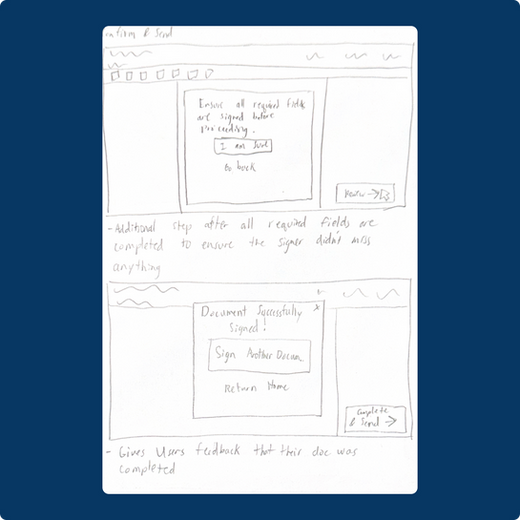


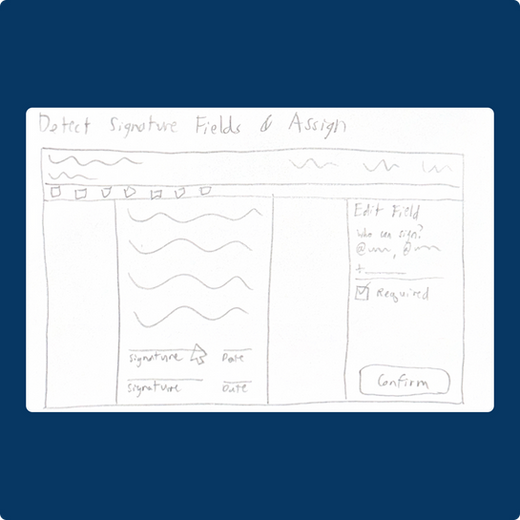
The next step after creating sketches for our redesign was creating the low-fidelity prototypes for them. These prototypes were created in Figma and cover both UX Flows 1 and 2.


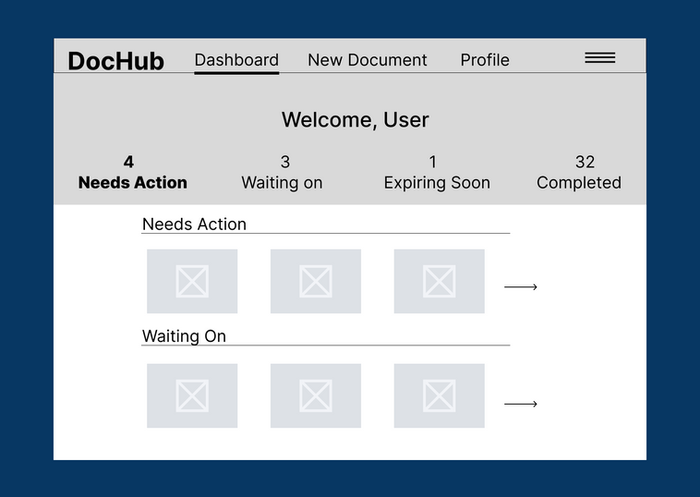


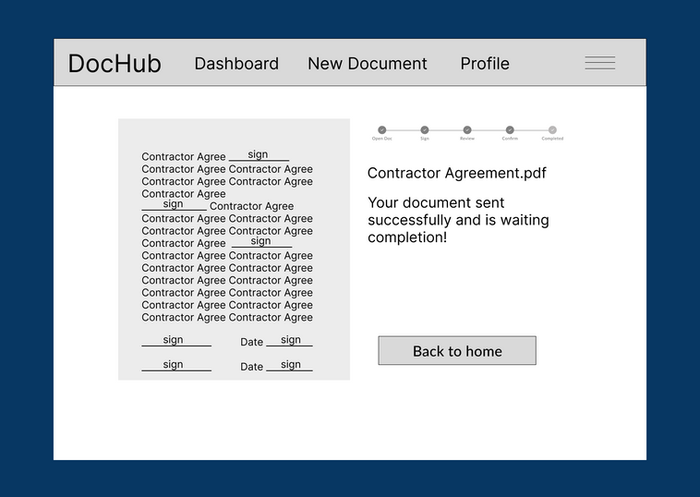
When comparing Prototype A and Prototype B, most participants preferred Prototype B but suggested improvements. Prototype B was favored for its more intuitive dashboard layout, better-integrated search functionality, and useful Recent Documents section. However, Prototype A had advantages, such as clearer document action sections (“Needs Action” and “Waiting On”) and a more compact dashboard layout. Overall, users appreciated Prototype B’s organization but preferred Prototype A’s clarity in document statuses and action items.
After concluding our user tests, we decided to revise our low-fidelity prototypes and proceed with creating our high-fidelity prototypes, keeping in mind the feedback we had received from our users.
For our high-fidelity prototype, we refined UX Flow 1 based on stakeholder feedback. The original screens lacked clarity and visual appeal, so we improved text readability and made signs more intuitive, addressing confusion on the dashboard. We also enhanced functionality by replacing the previous clients sidebar with a navigation panel for easier access to key features.
User testing confirmed UX Flow 1 as the preferred choice. Stakeholders, primarily business owners using DocHub for client signatures, found it more efficient. Moving forward with this flow allowed us to streamline the signing process, improving usability for both stakeholders and clients.

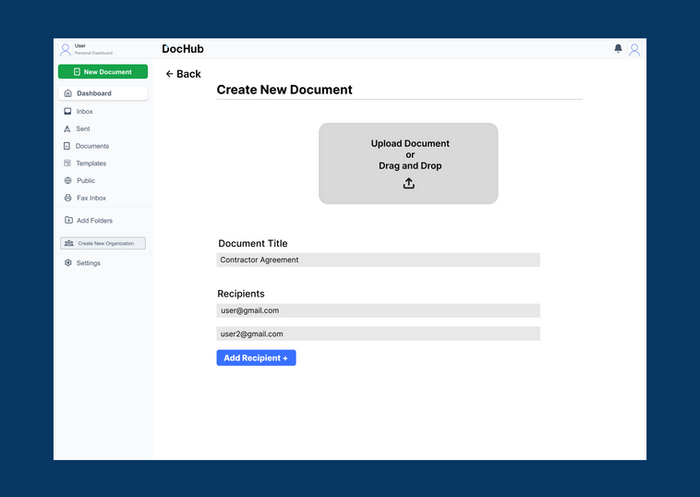


After completing our high-fidelity prototype, we tested it with a broader user group. Since we had already gathered feedback from stakeholders and experienced users, we saw value in evaluating our near-final DocHub redesign with general users. This group, consisting of infrequent DocHub users, provided fresh insights into usability and accessibility.
Additionally, we received feedback from an experienced UI/UX designer who assists in a Cognitive Science Design class at UC San Diego. Their expertise helped us refine key design details and enhance the overall user experience.

If you have any questions, feel free to reach out and contact me.

Kanpai’s brand new website brings modern Japanese dining online with a clean design, intuitive navigation, and streamlined ordering that reflects the restaurant’s warm, authentic atmosphere.
This Sony Sound Connect App Redesign makes it effortless to link, control, and customize speakers through a unified app, combining powerful functionality with a clean, user-friendly design.

This In-N-Out Kiosk brings the iconic menu to an intuitive digital interface, making it easy to customize orders, speed up checkout, and keep lines moving.